Watch button shortcuts, Tasker & Home Assistant with Notify
Your watch can be a shortcut to the things you do often. Use supported buttons or music controls to take a photo, run a phone action or trigger a routine in your connected home.
Notify maps supported wearable events to configurable actions on your phone. Available actions include media and camera controls, Tasker tasks, Home Assistant calls, HTTP requests and IFTTT webhooks.
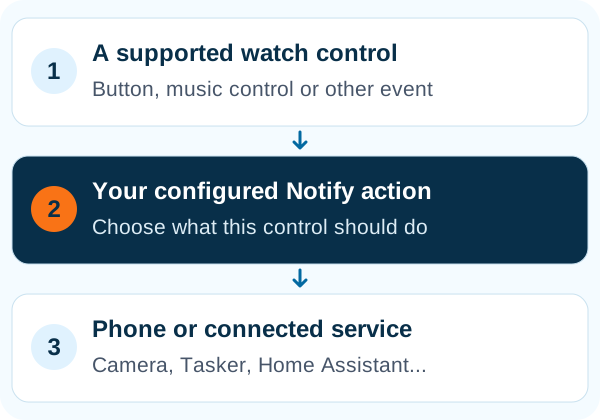
Start with one action you will use today
Assign a supported control to the camera shutter, find-phone sound, music playback or volume. Other actions include starting or pausing a workout, launching an app, toggling a mode, recording audio or recalling a quick note. The available gesture or button depends on the watch.
- Music controls as a shortcut menu
- On supported setups, next and previous move through actions and play runs the selection.
- Camera controls
- Choose a supported front- or rear-camera action and test camera access before relying on it.
- Message and location shortcuts
- Configure a message action, with an optional location appended when the relevant permissions and message method allow it.
Connect a wrist action to a bigger routine
Tasker/Locale integration exposes Notify commands and events for automation. Use the available plug-ins to control notifications, vibration, workouts, heart monitoring or supported watchface and picture actions. Custom triggers can run phone actions when configured events occur.
Make your watch part of your smart home
Connect Notify to Home Assistant using your server address and access token. Supported data can be published as states, and a watch action can call your configured Home Assistant action. HTTP request and IFTTT webhook options offer additional ways to connect your own services.
Use your existing Alexa setup
The Alexa integration provides account-linked commands, routines and notification options. Some flows use a configured command or phone audio, while suitable devices support additional controls. Check the relevant Alexa instructions; enabling the integration does not give every band a microphone.
Test the shortcut in the situation you need it
Try the action with the phone screen off as well as on. Android can restrict opening other apps while locked, and the official companion app can compete for music or find-phone controls. Use Notify's test options and device-specific setup notes to choose a reliable trigger.
Give wearable data a home in your dashboard
The enhanced Home Assistant sync option creates native entities with device and statistics support. It requires Home Assistant's MQTT integration to be configured and working. The standard API method remains an alternative when you prefer the existing state-sync approach.
Common questions
Can I use my Mi Band as a camera remote?
On supported setups, Notify can map a watch action to the phone camera. Grant camera access, choose the camera action and test it with your device.
Can Notify control Home Assistant?
Yes, the integration can publish supported wearable data and run configured Home Assistant actions. It requires a reachable server, a valid token and the appropriate configuration.
Does every watch button support remapping?
No. Notify can use only the events exposed by your model and firmware. Supported music controls provide an alternative on some devices.